

.svg)


Search has always been complex. Behind every query is an intricate network of information, an invisible scaffolding of content and links that make or break discoverability. For technical teams, maintaining this structure requires familiarity with algorithms that are often black boxes, plus the patience to slog through hours of highly-repetitive, highly-detailed optimization work.
And now in the era of AI-powered search, consumers are discovering content across multiple platforms, requiring marketers to diversify their strategies and split their efforts. Meanwhile executives want faster results, pressuring marketing and engineering teams to do more with fewer resources.
AI search demands speed and agility, yet multi-step technical workflows take time and effort. Pulling crawl data, validating indexation, diagnosing metadata issues, and pushing fixes through internal systems often drags weeks of progress into months.
Luckily, we can answer the challenges AI search presents by using AI ourselves to make optimization workflows smarter, not harder.
In our recent post on Botify Assist, we showed how leveraging agentic AI to do the heavy lifting of content and publication workflows could save your team hours (and even days) of work. In today’s post, we’ll look at how applying AI to the technical side of SEO can also reduce time-to-impact across technical research, data analysis, and implementation.
Rethinking technical SEO with agentic AI
Technical SEO work isn’t glamorous, but it is essential to the online success of your brand. Often it involves tedious tasks such as diagnosing errors hidden deep in crawl data, assessing how indexable a page really is, or confirming whether hreflang is correctly implemented across dozens of regional sites. Done manually, these checks demand painstaking attention to detail and a great deal of time.
Botify Assist leverages multiple, powerful agents to navigate your complex website data and turn insights into clear, actionable recommendations. It serves as your AI copilot to simplify technical tasks and speed up implementation. Instead of parsing endless spreadsheets and reports across disparate tools and search platforms, your team can surface the insights they need instantly and then act on them quickly, ensuring you're found wherever consumers, bots, and AI agents search.
Save hours on technical research and analysis
Audits and diagnostics are the backbone of technical SEO, but they’re also the most time-consuming part of the job. With Botify Assist, your team is able to automate common checks that used to take up entire work days.
Uncover URL errors and metadata issues
Error detection usually begins with manual filtering of crawl logs and piecing together a list of URLs with problems. That’s work that takes hours and often introduces human error when scaling across large sites.
Instead, you can use Botify Assist to simply ask: “List all URLs with 404 status codes from the latest crawl.”
In seconds, you’ll have a structured list of problem URLs ready to hand off, without sifting through spreadsheets. You can also see how a URL is performing by prompting “Tell me the SEO performance of [a URL]” to quickly pull and analyze metadata, indexing status, and crawl data.
Do the same for metadata and canonical checks: “Do I have missing metadata on [a webpage]?”
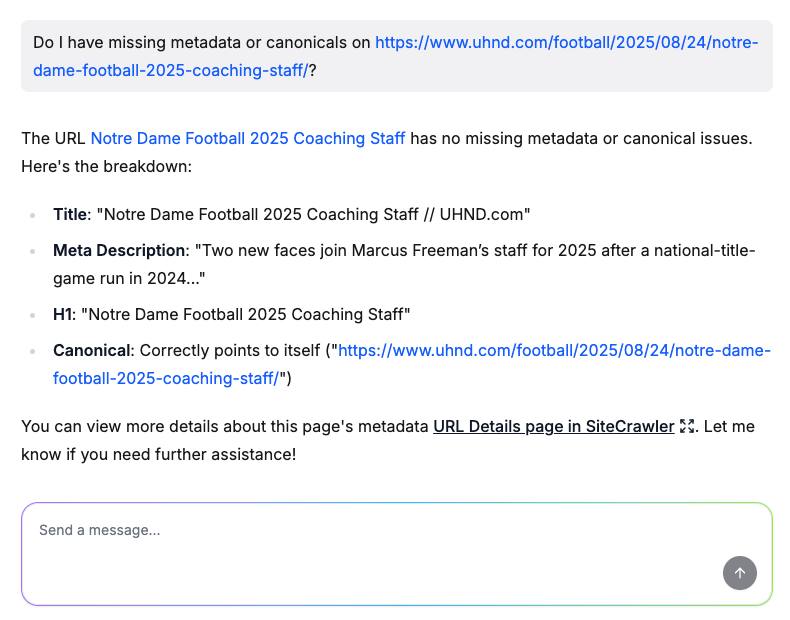
Instead of pulling dozens of reports you’ll have to manually parse, the agent surfaces exactly what you’re looking for instantly.
Check indexation status
One of the most frequent tasks technical SEOs must do is to confirm whether search engines are indexing a page correctly. Manually, this involves looking at crawl data, checking canonicals, and reviewing robots or noindex tags. Botify Assist reduces that complexity to a single query: “Is Google indexing [a URL]?”

The agent cross-references all that data for you and delivers a clear yes/no answer with context, like missing canonical tags or incorrect noindex settings.
Surface hreflang issues
For multinational brands, hreflang attributes are an integral piece of their online visibility. These tags direct customers to the page versions that are optimized for their geographic region and/or language, ensuring they see the most relevant information (e.g. pages in Spanish for Spain-based consumers, or British English for those based in the UK). Yet validating whether hreflang is implemented correctly across multiple markets is time-consuming and monotonous.
Rather than spot-checking by hand, ask: “Are there any hreflang issues on [a multilingual site]?”
The agent reviews hreflang attributes at scale and quickly surfaces any issues, making it easier to ensure international customers are actually seeing the right localized content.
Identify opportunities and simplify prioritization
With so many sources of data, opportunities are often missed. Botify Assist helps unearth them.
For example, to build out a strategic internal linking structure, ask: “Which internal pages should I link to from [a new article]?” and get a list of relevant internal pages to link to from new and existing content.
But even with a long list of errors and opportunities in hand, prioritization remains a sticking point. Which issues matter most? Which opportunities will actually move the needle? Normally, answering those questions means cross-checking data or manually weighing potential traffic impacts.
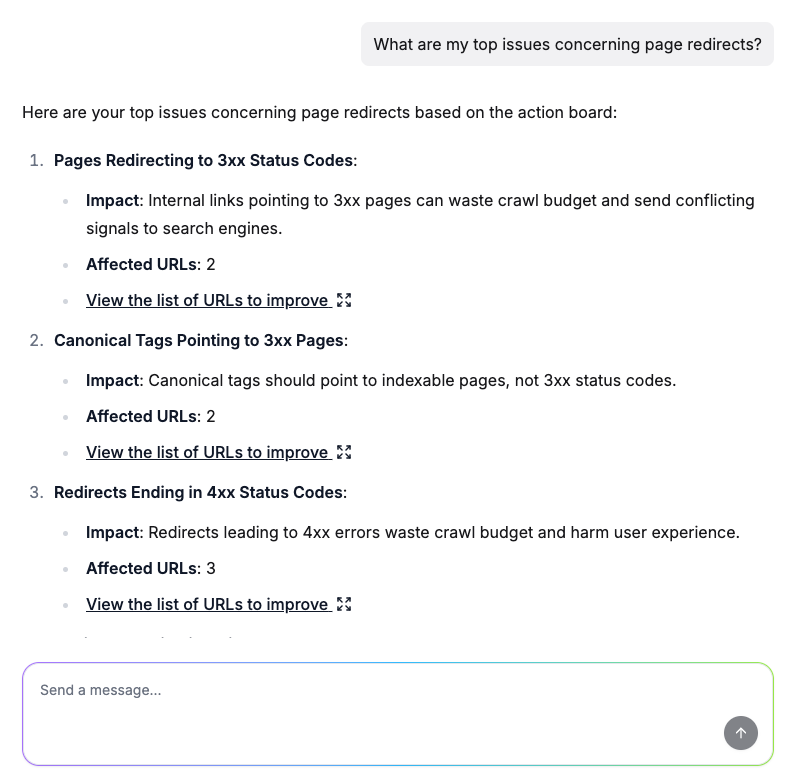
With Botify Assist, simply prompt: “What are my top issues concerning [technical search]?”
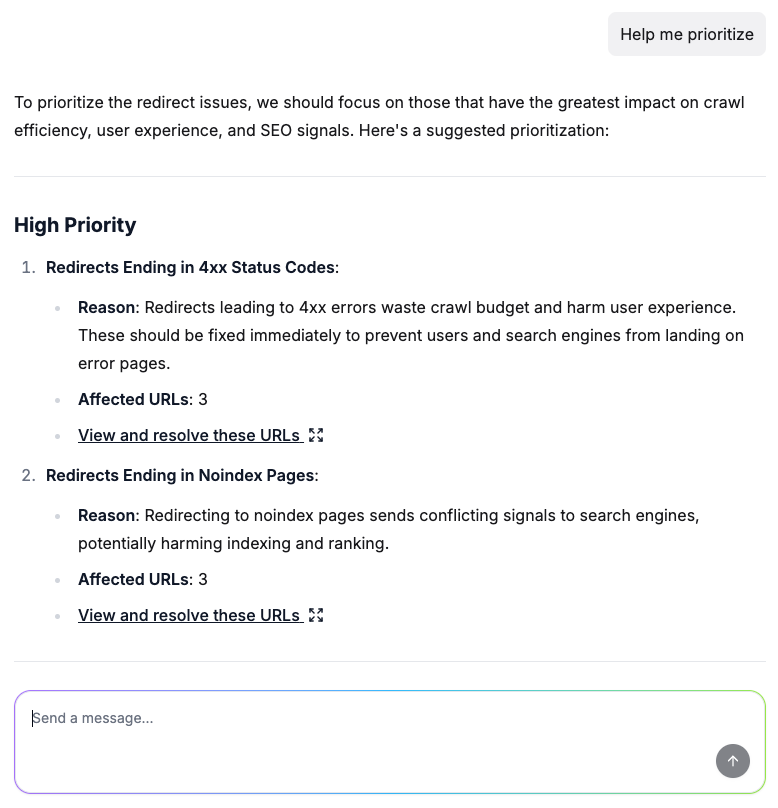
In seconds (not hours), you’ll get a prioritized set of issues affecting your organic search traffic straight from ActionBoard, distilled into clear recommendations so your team knows exactly where to start.
Save hours on action and implementation
Identifying problems, opportunities, and priorities are just the first hurdles of technical optimization. Execution is often where workflows get stuck. Between formatting exports correctly and waiting on developers to find time for your priorities, implementation can stall even the best strategies.
Botify Assist accelerates this phase of work by integrating directly with other systems your team already uses.
Export data and insights
Sharing findings across teams often involves endless copying and pasting into slides or spreadsheets. Eliminate that step by prompting: “Export my technical research into [a format].”
Instead of wasting hours wrangling data, the agent prepares an export that’s ready to share via your preferred format — freeing your team to move straight to discussion and action.
Push tasks directly to JIRA
Creating detailed tickets for engineering teams can be a surprisingly heavy lift. You have to format data into actionable exports and write up justifications or additional context, all of which takes up valuable time.
Instead, prompt Botify Assist to take on that lift for you: “Can you create a JIRA ticket for [an insight]?”
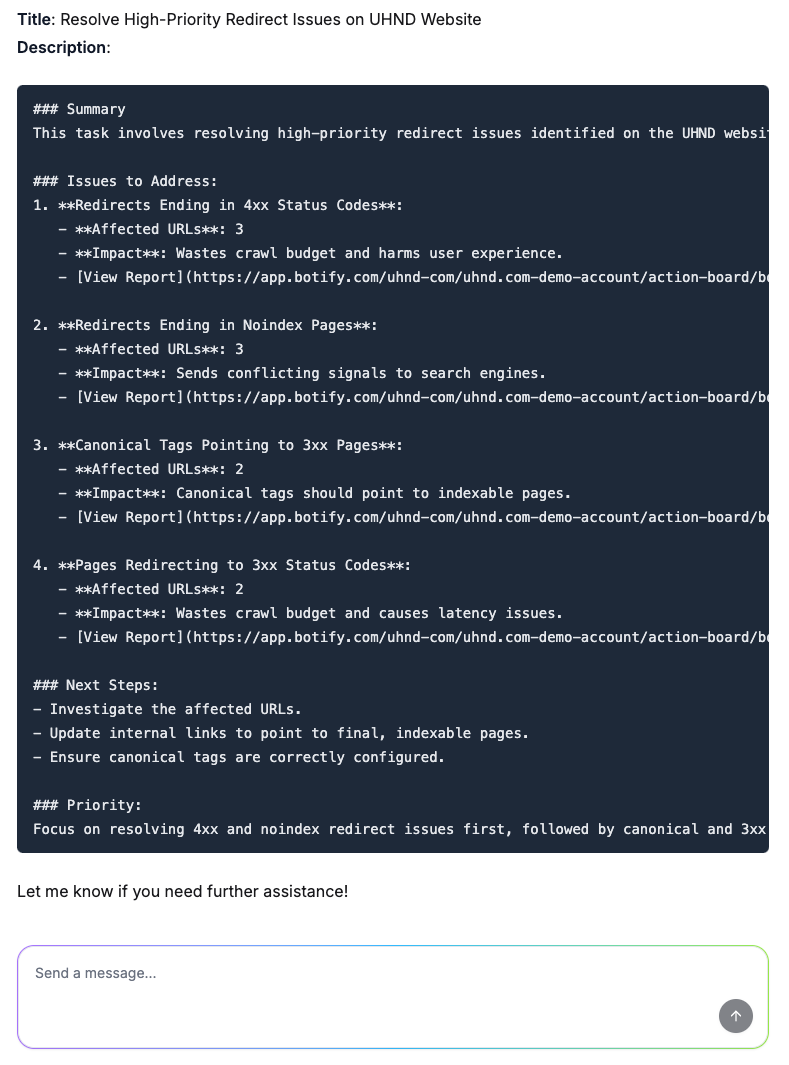
The agent generates a pre-filled JIRA ticket, making sure nothing gets lost in translation and allowing your team to move quickly from analysis to task assignment.
Push optimizations to PageWorkers
PageWorkers, part of Botify Activation, already speeds up time-to-impact for brands by granting marketing teams the autonomy to implement technical changes without relying on the engineering department.
For example, i-Run, a running, fitness, and hiking equipment retailer with over 75,000 product pages, used PageWorkers to free up IT bandwidth and automate optimizations and enhancements at scale, saving time and making high-value initiatives more efficient, eventually leading to a 99% increase year-over-year in organic clicks.
Now with the power of AI, brands can circumvent developer backlogs entirely and shorten the time from insight to implementation even more by combining the agentic power of Botify Assist with deployment at scale through PageWorkers.
Accelerate technical optimization with AI
AI-powered search isn’t slowing down, and neither are expectations for search visibility. The brands that succeed will be those that adopt AI not just for content, but for the technical backbone of their sites.
Botify Assist helps you get there, not by replacing expertise, but by multiplying its efficiency. By streamlining audits, clarifying priorities, and accelerating implementation, it shortens the gap between insight and impact. Instead of drowning in manual work, your team can focus on strategy and growth.
Ready to see it in action? Request a demo today.
.png)

.svg)
.svg)
