

As soon as ChatGPT promised to grow as a new revenue source, brands everywhere added the same thing to their wish list:
First-party data, insights, and metrics — essentially “Google Search Console but for OpenAI.”
On November 10th, 2026, OpenAI granted that wish, releasing Businesses in ChatGPT in beta.
It’s a big deal for several reasons: today, over 1.2 billion people use ChatGPT every week. We’ve benchmarked that a median of 93% of AI referrals are coming from ChatGPT, and we’ve seen +223% growth in AI referral sessions between H1 2025 and H1 2026. OpenAI’s influence over how consumers discover, research, and buy products is growing every day.
What is Businesses in ChatGPT?
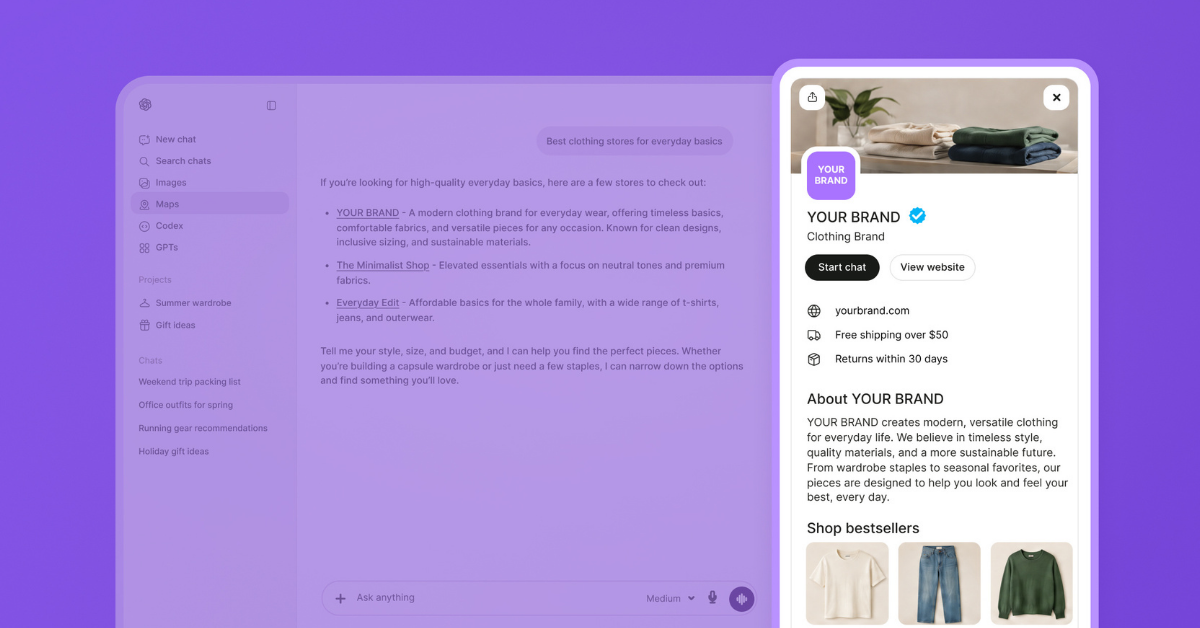
Businesses in ChatGPT allows a business to claim its verified profile within ChatGPT, keeping its details and product data up to date, showing how often ChatGPT mentions the business, and even building their own AI agent (similar to Google’s Business Agents.) Think of it as Google Business Profile, Merchant Center, and Search Console rolled into one, for OpenAI.
TL;DR: ChatGPT Business Profile
- You can claim your business at chatgpt.com/business-hub. In addition to claiming the listing, you’ll need to verify it with a Persona ID check. After both are done, you’ll be able to edit your profile, add products, view insights, and build agents.
- Consider your Business Profile and product feed sources of truth. Keep each of these as accurate and context-rich as you do your live website. Because OpenAI has stated that ChatGPT may use these sources to answer customer questions, out-of-date or inaccurate data could impact answers (and conversions.)
- The Business Hub offers data, but not all your data. It provides how often ChatGPT references your website, the amount of clicks it generates, and the topics you’re cited for. If you see a blank tile, that doesn’t mean there’s no data — just too little data to report on. Because it covers only the past 28 days and doesn’t currently provide an export, make sure to back up your numbers.
- Claiming your profile isn’t a silver bullet for visibility. OpenAI has stated that while giving ChatGPT a better understanding of your business can help it show up in relevant conversations, it “should not have an impact” upon mention or citation frequency.
What can you do with ChatGPT Business Profile?
There are four key components that make up your ChatGPT Business Profile. Each one contributes to improving OpenAI’s understanding of your business. As we know from our own push and pull framework, giving agents rich, accurate context is the best strategy for improving your AI visibility.
Verify your profile
As an eligible business, you can get a “blue check” verification on your profile once you’ve A) claimed your listing, and B) passed the Persona ID check, a third-party identity verification service. Your blue checkmark will appear upon approval from Persona.
Update business details
Once verified, you can update your profile with your business details, similar to what you’d populate in a Google Business Profile:
- Website
- Description
- Category
- Logo
- Cover photo
- Shipping and return policies
Upload product feeds
Online stores with product catalogs can upload their product feeds to provide ChatGPT with a direct source of catalog information. You can provide this info a few ways:
- Upload your file as a CSV (which should conform to OpenAI’s product specs, and ideally be ACP-compliant)
- Provide a feed file via a hosted URL
- Connect a Shopify feed
What should you know about product feeds and Businesses in ChatGPT?
If you use Shopify, your products already reach ChatGPT through the Shopify Catalog. You can connect your store from either ChatGPT’s Business Hub or the Shopify admin. Additionally, Etsy catalogs are already integrated in ChatGPT; businesses that sell via Etsy don’t need to take further action.
When uploading a feed file as a non-Shopify or Etsy store, you’ll want to follow the OpenAI product feed specifications that include 9 fields per item, including the seller name. While OpenAI feeds share many fields with Google Merchant Center fields, there are differences, and following OpenAI’s specs will result in better optimization for ChatGPT (long story short, paid feeds aren’t enough for AI.)
Keep in mind that even uploading a highly accurate, optimized product feed isn’t a guarantee your products will show up in chat. ChatGPT still finds products by exploring your website, so give yourself the best chance at visibility by ensuring your feeds and website say the same things.
Build a Business Agent
The Business Agent in ChatGPT is similar to the Business Agent for Google: a dedicated, branded AI agent that shoppers can chat with from your profile. Right now only open to eligible US e-commerce and online service businesses, Business Agents can answer customers using your instructions and product feeds; however, it cannot take payment, make bookings, or look up orders. Shoppers still buy on your website. You can also promote your Business Agent via ChatGPT Ads.c
How do you claim your business in ChatGPT?
Follow these steps to claim your business in ChatGPT:
1. Head to the Business Hub and search for your business.
Then, choose your listing. If you’re an online business and your listing doesn’t appear, you may be able to add one. However, local businesses and restaurants are only able to claim existing US listings at the moment, and cannot add them as new.
2. Verify your claim.
You can do this a number of ways: a code via text, a call to your business phone, a code to your business email, providing a DNS record, or via your Shopify store. Your claim will be reviewed by OpenAI and you’ll receive the decision via email. If you’re an existing OpenAI enterprise customer or advertiser, you have the special benefit of being able to claim your business via your OpenAI representative.
3. Pass the Persona ID check.
You’ll have to provide some documentation, such as a government ID, business registration details, and proof that you’re qualified to make decisions for the business.
4. Fill out your profile and triple-check it before submitting.
Once approved by OpenAI, your new profile will go live! Remember that it can’t be deleted afterward; ensure details are accurate and complete.
5. Upload your product feed.
Make sure all your information is flowing by spot-checking its prices against your live product pages.
Pitfalls to watch out for when claiming your listing
As you claim and verify your ChatGPT Business Profile, make sure you’re setting your organization up for success in the long run. You should double-check the following:
✅ Are you using a company email address?
Accounts are tied to the email address that claims them. If an employee claims and manages the profile with a personal login, then leaves the company, you’ll be high and dry figuring out access.
✅ Do multiple team members have access?
Once you’re verified, make it a priority to give a second team member or agency access so you don’t risk getting locked out.
✅ Are you sure you aren’t creating a duplicate listing?
Make sure to search carefully before deciding to create a new listing. If it happens that your business has been erroneously claimed, you can use the Dispute Ownership option in the Business Hub.
✅ Are you claiming both brands and locations?
Because each brand is claimed and managed on its own, claiming the main brand doesn’t automatically claim its store locations.
✅ Do you have the documents you need, and do they match official records?
Come prepared with your DNS access, business phone, and/or business email to make your claim. Persona requires that the name, address, and registration number you enter matches official records.
✅ Are your product feeds optimized, enriched, and AI-ready?
Porting Google Merchant Center feeds into OpenAI isn’t ideal; they’re built for Google Shopping results and ads, and don’t provide the context a platform like ChatGPT needs to craft satisfying responses for customers. Because you’re providing this data directly to OpenAI, it’s a trusted source of truth. Make sure that source has everything you want your customer to use along the buyer journey, including AI-first feed attributes like Q&A, reviews, and more.
✅ Are you fully testing your Business Agent before launch?
You can’t read Business Agent chats after it launches, so make sure it’s able to answer even tough customer questions accurately and satisfyingly.
What data does Businesses in ChatGPT provide?
First-party data directly from ChatGPT is an exciting development, but what exactly are you getting with this release?
Here are the facts today:
- Mentions: Mentions are either site mentions or location mentions, meaning that a “mention” for an online business only counts when it accompanies a reference to your website; just sharing the brand name alone doesn’t count. And for local businesses, a “mention” counts when they show location results.
- Website clicks: Just like they sound, these are clicks on links to your website from ChatGPT. Because clicks aren’t necessarily visits or sales, you’ll want to compare them with referrals from ChatGPT.com in your analytics.
- Discovery topics: Discovery topics help you understand the common themes in conversations where ChatGPT mentions your website. These can help you identify topics where you’re missing, too.
- Profile views: As yet undefined by OpenAI, profile views are included as a metric in early screenshots, measuring customer views of your dedicated business profile.
What data doesn’t Businesses in ChatGPT provide?
- Historical data: These insights cover only the most recent 28 days worth of data, and there isn’t currently an export option, so you’ll want to manually back up your data.
- No prompts or chats: You can’t see exactly what customers are asking or what’s said about your brand, just mention rates and topics.
- Share of voice / competitor data: You can’t see where you stand in the competitive landscape or get a clear view of how much of the conversation your brand dominates.
- Skewed data for certain brands: If your brand sells mostly through retailers, you’ll see fewer mentions (since a mention is counted as a website citation.) This will paint an incomplete picture of your brand’s visibility on ChatGPT.
How can you get complete data?
Use the new data available in Businesses for ChatGPT as a complement to your existing work tracking and optimizing AI visibility.
Ensure ChatGPT can even find and see your product pages
First of all, while ChatGPT Business Profile provides understanding of how you’re doing on the platform, it’s missing one glaring issue: do you know if it can even reach all your product pages? Because it only reports on what it sees, you may have a blind spot related to the content it doesn’t know exists. Use a solution like Botify’s LogAnalyzer to track the actual signatures OpenAI leaves when it visits your website; this will prove whether ChatGPT is finding your valuable website content.
Understand visibility for mentions vs citations
Next, what ChatGPT Business Profile classifies as a “mention” is usually called a “citation” in typical AI search terms. Remember that because ChatGPT isn’t reporting on the times your brand is mentioned without a link, there will be a gap in how it reports your visibility: what top-of-funnel topics might your brand be mentioned in without a link? What kind of research could your customers be doing — competitor comparisons, company history and values, etc. — that isn’t reflected in ChatGPT’s Business Hub? There’s a chunk of the customer journey missing in your ChatGPT Business Profile data. Shore up this weak point by tracking both brand mentions (no link) and citations (linked mention) in a solution like Botify’s AI Visibility.
Track your visibility beyond OpenAI: Google AI Mode, Perplexity, Claude, and more
And speaking of AI visibility, remember that customers are using more than just ChatGPT. You’ll need to track how you’re doing across every major agentic commerce platform, including Google and Perplexity. Botify’s AI Visibility tracks mentions, citations, and competitors across all of them to map your competitive landscape and show where you’re winning (and where there’s work to be done.)
Deliver enriched, AI-ready product feeds to ChatGPT and Google
Finally, the product feeds you upload to ChatGPT Business Profile will only impact your product data in ChatGPT — it won’t affect anything Google sees, and we know that today, Google still drives the bulk of traffic and revenue from AI. Botify’s AgenticCatalog will prepare enriched, ACP- and UCP-compliant feeds for ChatGPT and Google respectively, ensuring that you’re pushing accurate and complete product data to every platform, and that customers get the best recommendations no matter where they search.
Businesses in ChatGPT is a huge win for brands. By providing first-party insights that promise to deepen with time, OpenAI is making strides to compete even more closely with Google as a search engine.
Use this newfound data source as a complement to your existing analytics around AI visibility. Ensure your product feeds are enriched, being pushed to both ChatGPT and Google, and agree with your website product pages. And ensure that you go beyond analytics and take action to continually improve and optimize your presence in AI search with a solution like Botify Activation.