.png)

.svg)


Launched on September 8, 2026, Meta’s Muse is a personal AI agent that researches products, compares options, and buys them on the consumer’s behalf, using its own browser in the cloud.
Its activity ballooned quickly. HUMAN Security reports that Muse makes up about 72% of the AI-agent requests it sees, and that 84% of those requests go to product and search pages. In just two days, Muse achieved a request volume that took ChatGPT eleven months. Cequence found Muse traffic at more than half of the customers it studied within two weeks of launch.
For retailers, the biggest question is how that traffic gets counted. Muse doesn’t declare itself as an agent. It lands on your website looking like an ordinary desktop Chrome visitor, and most analytics tools count it as a person.
Here, we'll explore how Muse works, where its visits and orders show up in your data, how to detect it, and what it means for your product pages and catalog.
How Muse works
Every person using Muse gets a dedicated cloud computer (what Meta calls the “Muse Secure VM”), which runs a full Chromium browser.
There are four key things about Muse that are particularly important for retailers to understand:
1. It doesn’t identify itself as an agent
Meta hasn’t published a user agent, IP range, or robots.txt token for Muse, and Muse doesn’t sign its requests under the emerging Web Bot Auth standard. When our partner DataDome captured live Muse sessions, they looked like traffic from desktop Chrome on Linux. What’s more, that traffic came from Cloudflare and Fastly addresses, not from Meta's own network.
Without these signatures, it’s almost impossible to attribute traffic to Muse.
2. It can run your JavaScript
When Muse visits in its browser, your page's scripts run just as they would for a person, contrary to how typical AI agents access your content. Google Analytics, Adobe Analytics, and your pixels all fire, tracking the visit. The built-in bot filter in Google Analytics 4 mostly catches bots that announce themselves, so because Muse doesn’t declare itself, it lets these sessions through. In addition, Muse can also fetch and read a page’s text on its own. Because that fetch skips JavaScript, it reaches your server but never appears in analytics.
All of this means that whether you know it or not, Muse visits are already in your reports.
3. It reads the accessibility tree
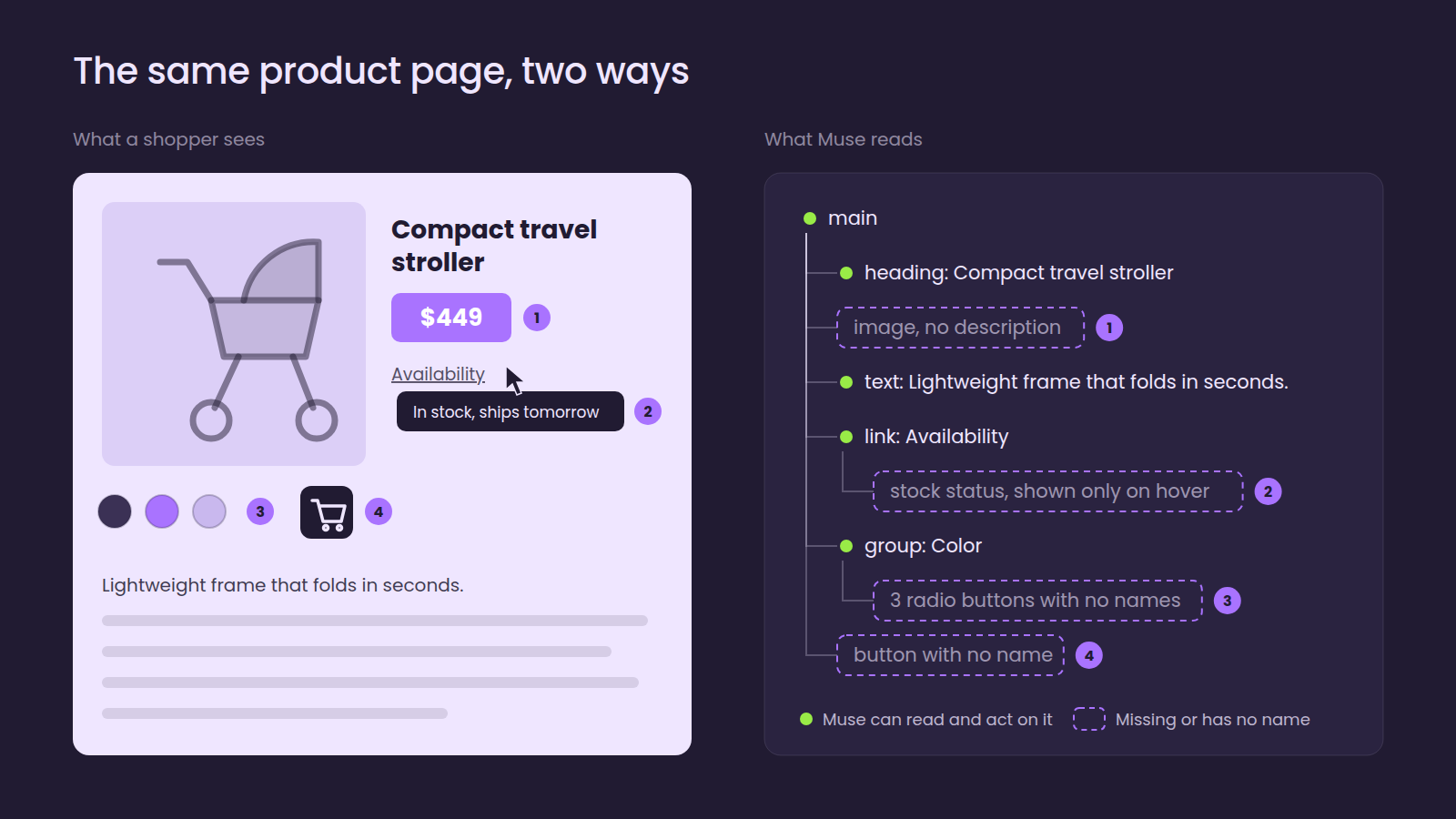
According to Meta's architecture documentation, Muse doesn’t look at your page the way a shopper does. It works off of a snapshot of the accessibility tree, which is the same structure a screen reader uses. The accessibility tree includes your rendered content, as it’s built after your scripts run. However, it only shows the information that’s exposed in that structure: roles, labels, headings, accessible names, and text — critical information for accessibility users, but potentially limited in context compared to the full page. The agent cannot run scripts of its own on the page.
4. It finds products via search and catalogs
Muse doesn’t keep its own index of the web. It finds products in one of three ways:
- Meta-reviewed connectors (fun fact: more than 1,500 developers applied in the first week!)
- Catalog integrations
- Browsing the retailer's site directly
We tested Muse ourselves recently. As of October 2026, we found that Muse described looking up Meta's product catalog and a web search service at the same time. It only opened links it found via those results; when it came to price and stock status, it referenced the live product page rather than trusting search snippets. Finally, once a cart is ready, Muse asks the user to approve before it buys.
In your analytics, Muse shows up 3 different ways
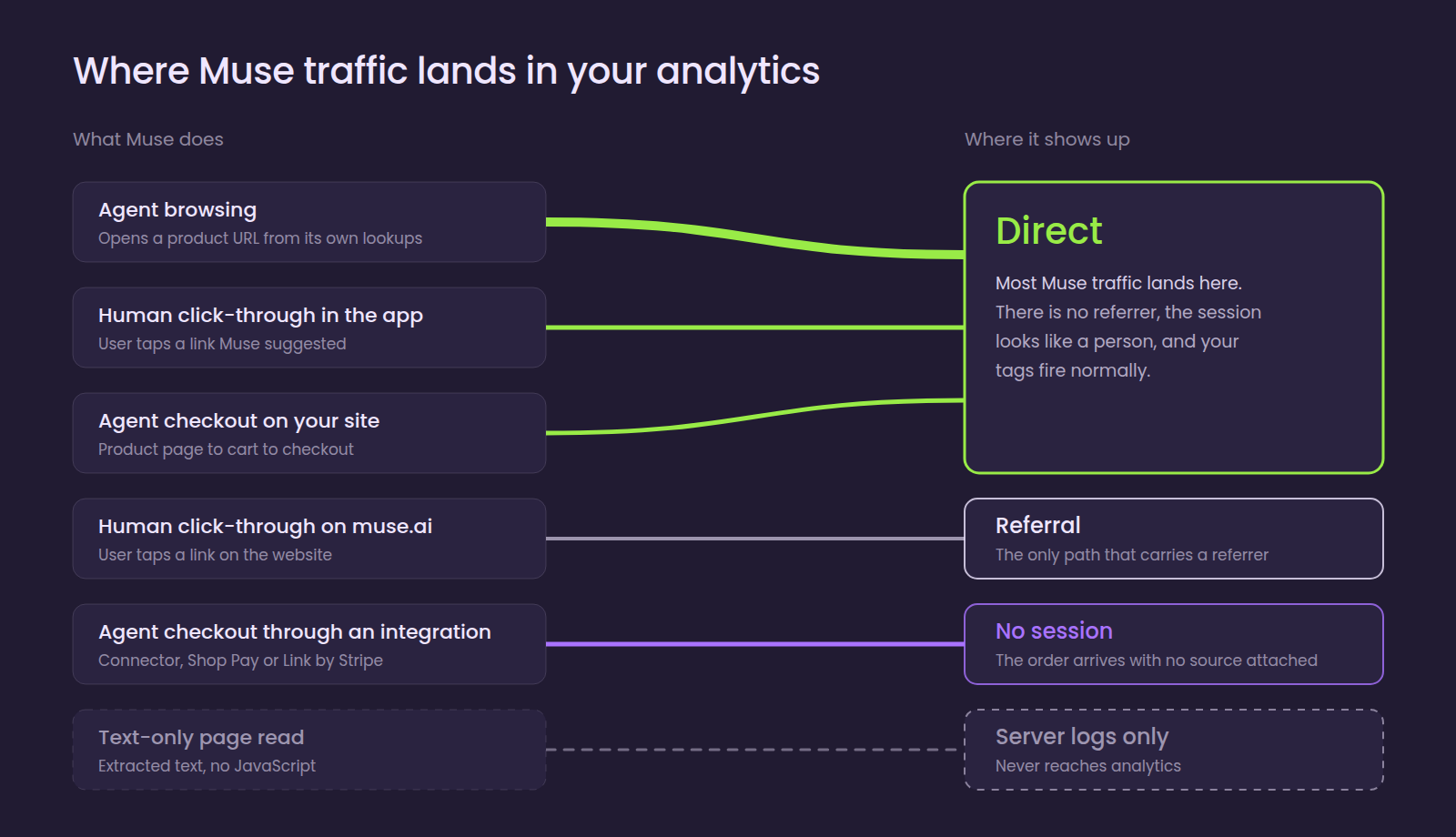
Muse creates three kinds of traffic in your analytics tools: direct, referral, and “no session.”
1. Direct traffic from agent browsing
Direct traffic from agent browsing makes up the bulk of what Muse does. It opens a product URL directly, using a link from a catalog or from search lookup. There’s no referrer, so the visit is recorded as “direct.” To count as organic search traffic, Muse would have to search inside its browser and click a result, a behavior that appears to be rare.
On the surface, these “direct” visits look exactly like activity from a person. Because an agent comparing several stores will buy from one at most, they inflate direct traffic while pulling its conversion rate down.
2. Referral traffic from human click-throughs
Sometimes Muse will show the user a shortlist of products, and the user will tap a link. From the muse.ai website, that visit arrives in your analytics as a referral. From the mobile app, it usually has no referrer and lands as direct traffic. GA4's AI Assistant channel, added last May, only catches the visits that carry a referrer.
3. “No session” traffic from agent checkout
Muse can complete checkout in two ways:
- When checking out on your site, its browser moves from product page to cart to checkout like any other shopper: your tags fire, and the order is credited to direct traffic. Nothing about the order identifies it as an agent-placed order; the SKU, payment, and confirmation email look the same as any other order.
- When purchasing via a connector or a payment service like Shop Pay or Link by Stripe, Muse skips your checkout pages entirely: your tags never fire, and the order appears in your commerce platform with “no session” behind it. Shopify merchants get Meta sales-channel attribution for these orders, but everyone else sees revenue with no source.
Considered all together, the signs since Muse launched on September 8 are fairly consistent:
- More direct traffic
- An unusual rise in desktop Linux Chrome visits
- Lower conversion rates in direct
- New sessions that land on a deep product page and buy within minutes
- More orders with no session attached
HUMAN Security found that Muse is 25% more likely than other agents to reach a checkout page, so real revenue sits in that last group.
How to detect Muse traffic on your site
While no single visit will reveal Muse activity, thousands of them together (and their patterns) do. Real shoppers use a wide mix of devices and browsers: mobile or desktop, Chrome or Safari, etc. Sessions from Muse share the same hardware and rendering fingerprints across unrelated sites, and their browser version changes almost all at once when Meta updates its fleet. Bot management vendors such as DataDome look for these patterns, with several now flagging Muse by name.
A practical approach could look like this:
- Start with a baseline: In GA4 or its BigQuery export, look at desktop sessions from Chrome on Linux, mostly in your direct traffic, and compare the weeks before and after September 8. Look for a sudden jump in volume, or one browser version taking over within days; this will help you understand the size of the problem. You can fill in the rest of the gaps with your server or CDN log file data, since they also record text-only fetches and visits that analytics misses.
- Pass the results into analytics: When your bot management tool flags a Muse session, your tag manager (server-side, if you have one) can label the session and set its source and medium. Next, send that medium to a dedicated AI agent channel; agent sessions, product views, and revenue will report on their own lines.
- Reconcile agent checkouts on the server: Record the order source in your commerce platform and send those purchases to analytics through GA’s Measurement Protocol or your data warehouse. Without this step, you’ll never see agent revenue in your analytics at all.
Some of the more common shortcuts aren’t enough. Meta's published IP ranges cover its declared crawlers and fetchers, but not Muse's browser sessions. A datacenter IP is a useful clue but it’s not proof, as the same Cloudflare ranges also carry consumer privacy and VPN traffic. User-agent rules have nothing to match.
Lastly, check what your security tools already do with Muse. Some sites are blocking it wholesale; for instance, Amazon blocked Muse on purpose in September, in part because it does not identify itself. Shopify, Walmart, Best Buy, Gap, Sephora, and Wayfair chose to partner with Meta, though not all of those integrations are live yet. Either path can make sense, as long as it’s a deliberate choice.
What can Muse read on your pages?
Because the Muse agent reads the accessibility tree, it can only act on what that tree exposes. A human shopper can recognize a price included on an image, view availability that appears on hover, or an add-to-cart button that appears only as an icon. Muse may not see any of them.
You can assess where your key templates stand with the following questions:
- Are price and availability on the page as text?
- Do variant selectors, filters, and add-to-cart buttons have accessible names?
- Do the headings make clear which product the page is about?
- Is your important content in the server-rendered HTML? Text-only fetches don’t run JavaScript, and the browser agent won’t hover or click around to reveal hidden content.
Muse can still reach a page that fails these checks, but it can’t read it reliably and will move on to a more readable competitor’s page.
Most of this is the same work that makes pages readable to search engines and AI crawlers: pages that load and render cleanly, with clear structure and accurate product data. Search engines, answer engines, and shopping agents all use that same foundation. When you’re prioritizing agent readiness on your site, it belongs alongside your other AI visibility work.
Product catalogs are a discovery channel for Muse
Meta's product catalog gives Muse a quick and structured way to find products to recommend and buy. If your feed is complete and current, you can be in the running before the agent ever opens a browser.
The catalog alone doesn’t make the final call, though. Muse checks price and stock on the live product page, and early outside research suggests many final picks come from live merchant sites. You actually need both: a feed that gets you considered, and product pages that reinforce what the feed says.
Feed quality and catalog coverage have usually been a paid social concern. But now that agents are doing the shopping, they’re a discovery concern too, alongside crawl access and structured data.
5 steps to start with
If your team hasn’t examined your Muse agent traffic yet, these five steps are a good place to start:
- Measure a baseline of agent traffic from the Linux Chrome segment in Direct, your server or CDN logs, and orders with no session, and compare it against the period before Muse launched on September 8, 2026.
- Agree on an agent policy with your security team, and choose a bot management vendor that identifies Muse by name so the policy can be enforced and measured.
- Check your highest-revenue product and category templates against the accessibility tree, starting with price, availability, variant selectors, and add-to-cart.
- Make sure your Meta product catalog is complete and current, and that live prices and stock match the feed. Then, decide whether the connector program is a fit.
- Report agent sessions and revenue separately from human activity until detection and reconciliation are in place.
This should get easier over time. Standards like Web Bot Auth would let agents sign their requests so sites can verify them, and platforms are starting to push for it. Shopify already applies its strictest rate limits to bots and agents that don’t sign. Muse launched without signing, though, and OpenAI's Dots and xAI's Grok Bot launched right around the same time. Retailers that start measuring agent traffic now will know its worth by the time the standards catch up.
Botify can help
Our consulting team helps enterprise retailers measure agent traffic, separate it from human performance, check templates for agent readability, and build reporting for AI-driven channels. To see how Muse and other shopping agents are affecting your site, book a consultation.

.svg)
.svg)
