

.svg)


You cannot improve how your brand appears in AI experiences if bots cannot see your updates, understand your pages, or access complete product information. This month’s releases give you more control over each step.
Read on to see how you can apply PageWorkers optimizations to AI bots, implement webpage delivery safeguards faster, and guide and verify how your catalog is enriched.
PageWorkers at Edge now in Open Beta: Test and optimize your site for AI Bots
PageWorkers lets you test and deploy reversible site changes that improve discoverability and selection without waiting on engineering. With a new server-side delivery method, you can now apply those changes to AI bots ensuring they see your optimized content that powers AI answers and product recommendations.
Add useful context like FAQs and summaries, or simplify pages to make key information easier for AI systems to find. Edge delivery works alongside the existing lightweight PageWorkers JavaScript snippet, so you can manage changes for AI bots, traditional search engines, and shoppers from one tool.
Contact your Account Manager to get started or learn more about PageWorkers here.
Botify Assist in SpeedWorkers: Configure quality controls faster
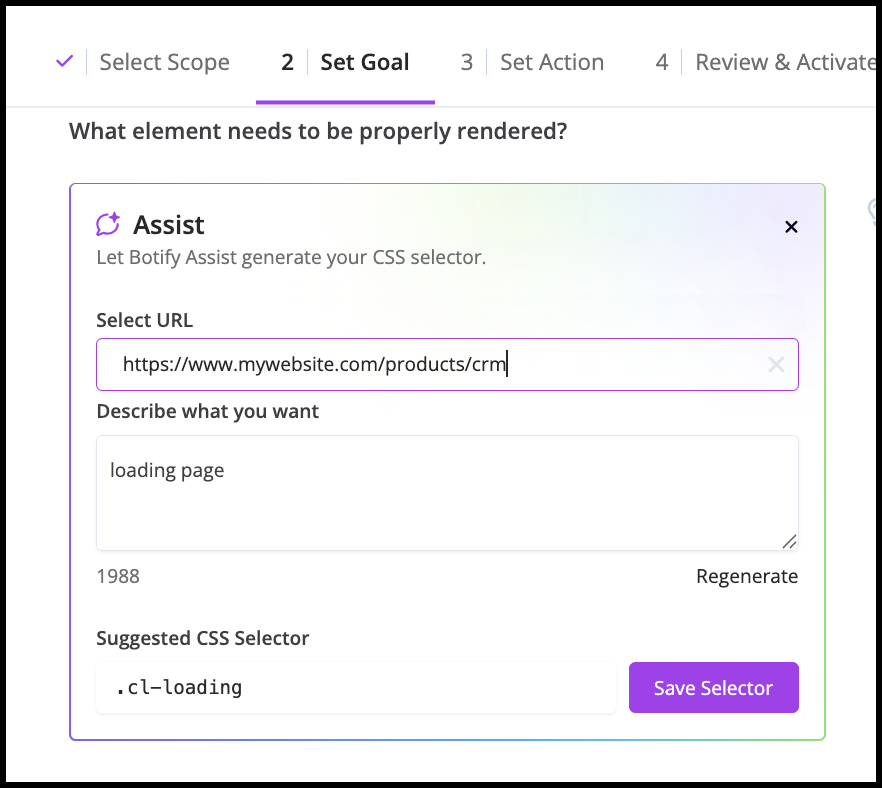
Quality Controls ensure AI bots receive complete, accurate pages by verifying that critical elements like product details, pricing, or availability are present before SpeedWorkers serves the page.
Botify Assist now makes those controls faster to configure. Simply describe the page element you want to verify, and Assist suggests the CSS selector SpeedWorkers can use to find it. Instead of searching through page code manually, you can deploy quality controls across your large site in minutes.
Learn how to configure Quality Controls in SpeedWorkers with Botify Assist here.
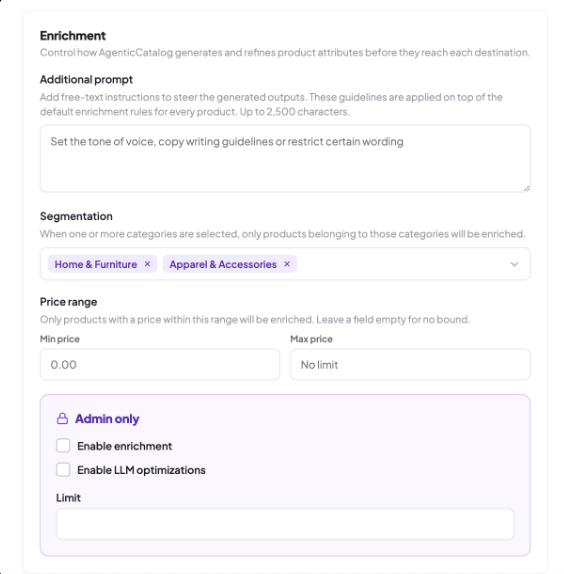
AgenticCatalog Enrichment Settings & Testing: Control how your catalog Is enriched
Choose which products to enrich by filtering on specific product categories or price ranges. Then, guide the output with specific instructions based on your brand voice, copy standards, or legal requirements, and decide whether enrichment uses crawl data alone or includes LLM optimization.
Before applying changes across your entire catalog, test your configuration on a sample of products. Preview the results, refine your settings, and confirm that the output meets your requirements before deploying at scale.
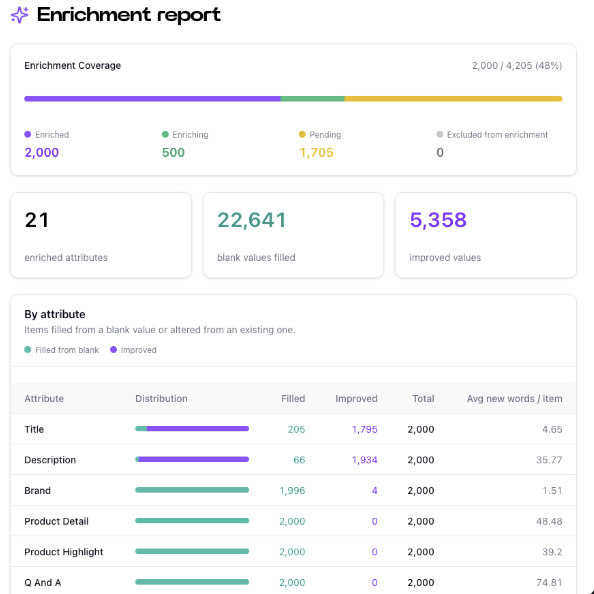
AgenticCatalog Enrichment Report: See exactly what improved in your catalog
See enrichment coverage and results across your entire catalog in one place Understand how many products and attributes were enriched, how many missing values were filled, and how many existing values were improved, with a detailed breakdown by attribute.
Validate enrichment at scale and confirm your product data includes the rich, accurate context AI systems need to understand, compare, and recommend your products.
Learn more about AgenticCatalog here.
.png)
.svg)
.svg)
